TCV ModMaster v1
Ultimate Mod Manager for The Choicer Voicer
About
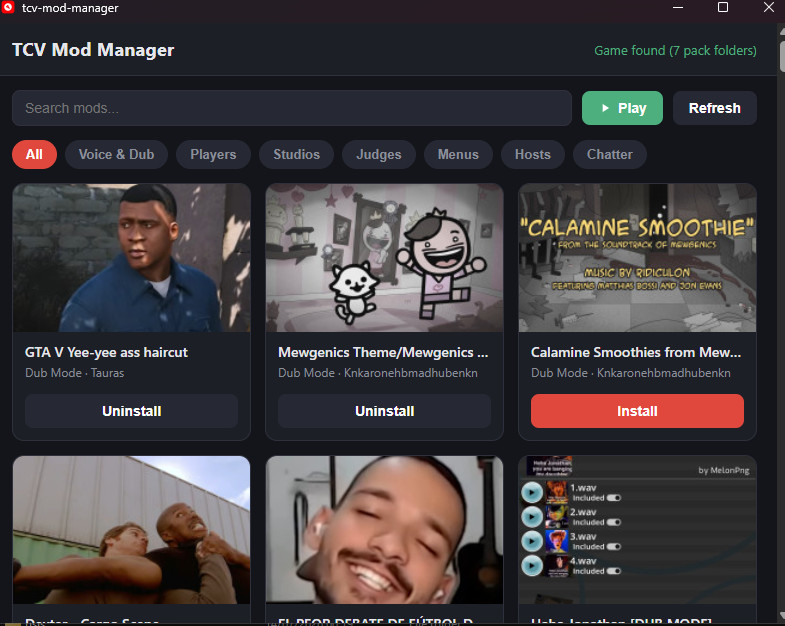
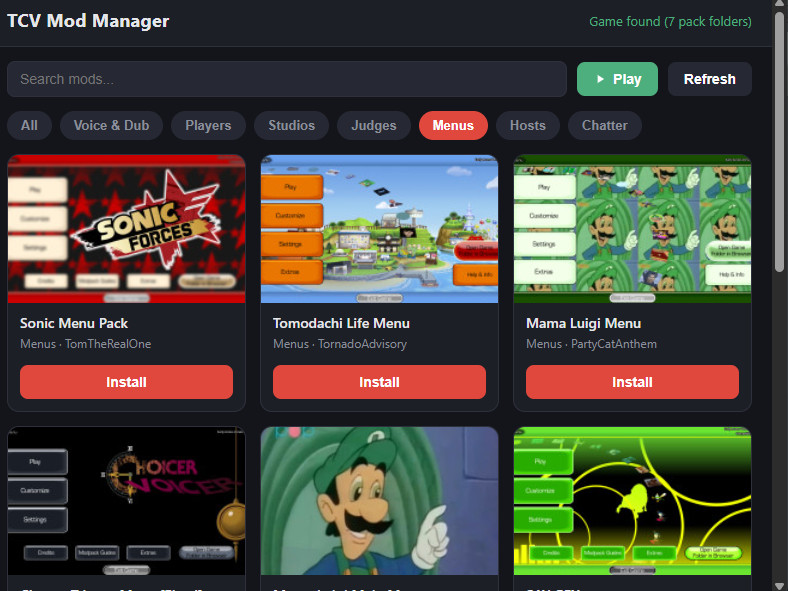
TCV ModMaster is the smarter way to manage your TCV mods. One‑click install, auto‑updates, profile switching, and cross‑platform support – all in one sleek app. Ditch the manual extraction! Just paste a GameBanana or Nexus Mods link, and we handle the rest.
Key Features
Supports GameBanana, Nexus Mods, and more – not just one source.
Available on Windows, macOS, and Linux – use it on any system.
Auto‑update for your installed mods – always stay up‑to‑date.
Profile manager – save and switch between different mod sets instantly.
One‑click install – no downloading zips, no extracting, no copying folders.
Built‑in search and filter – find the perfect mod by type, date, or popularity.
Backup and restore – never lose your mod configuration again.
Play button – launch TCV straight from the manager.
Automatic folder detection – finds your game installation path on its own.
Clean, modern UI – dark theme with neon accents, resizable window.
How to Use
- Download TCV_ModMaster.zip and extract it anywhere.
- Run TCV_ModMaster.exe (or the equivalent for your OS).
- The tool will auto‑detect your TCV installation folder.
- Paste a mod URL into the input field and click “Fetch & Install” – or browse mods directly from the built‑in search.
- Toggle installed mods on/off with a simple switch.
- Click “Play” to launch The Choicer Voicer with your selected mods active.
Requirements & Installation
Requirements
- Windows 10/11, macOS 10.15+, or Linux (Ubuntu 20.04+ / equivalent)
- The Choicer Voicer installed
- Internet connection for fetching mod data
Installation
- Download the .zip archive from this page.
- Extract to any folder (e.g.,
C:\TCV_ModMaster). - Run TCV_ModMaster.exe.
- (Optional) Pin to taskbar or create a desktop shortcut.
No admin rights required – fully portable.
FAQ
Does it work with GameBanana and Nexus Mods?
Yes – both are fully supported, and we plan to add more sources.
Yes – both are fully supported, and we plan to add more sources.
Can I use it on macOS or Linux?
Absolutely – cross‑platform support is a key feature.
Absolutely – cross‑platform support is a key feature.
Will it break my current mods?
No – it backs up files before changes and allows you to restore.
No – it backs up files before changes and allows you to restore.
Is it safe?
Yes – Windows may show a warning because the app is not code‑signed. Click "More info" then "Run anyway". Feel free to scan with any antivirus.
Yes – Windows may show a warning because the app is not code‑signed. Click "More info" then "Run anyway". Feel free to scan with any antivirus.
Download TCV ModMaster
Take full control of your TCV mods – install, update, and switch profiles in one click.
Login to Download