
GameFPS Booster v3
Ultimate performance accelerator for PC gaming
About
GameFPS Booster is a powerful, open‑source tool designed to maximize your gaming performance. Whether you're a casual player or a competitive esports athlete, our optimizer squeezes every last frame out of your hardware.
Performance
Real‑time tuning for maximum FPS
Precision
Game‑specific profiles for 50+ titles
Intelligence
Adaptive algorithms that learn your system
Safety
No overclocking, no registry damage, fully reversible
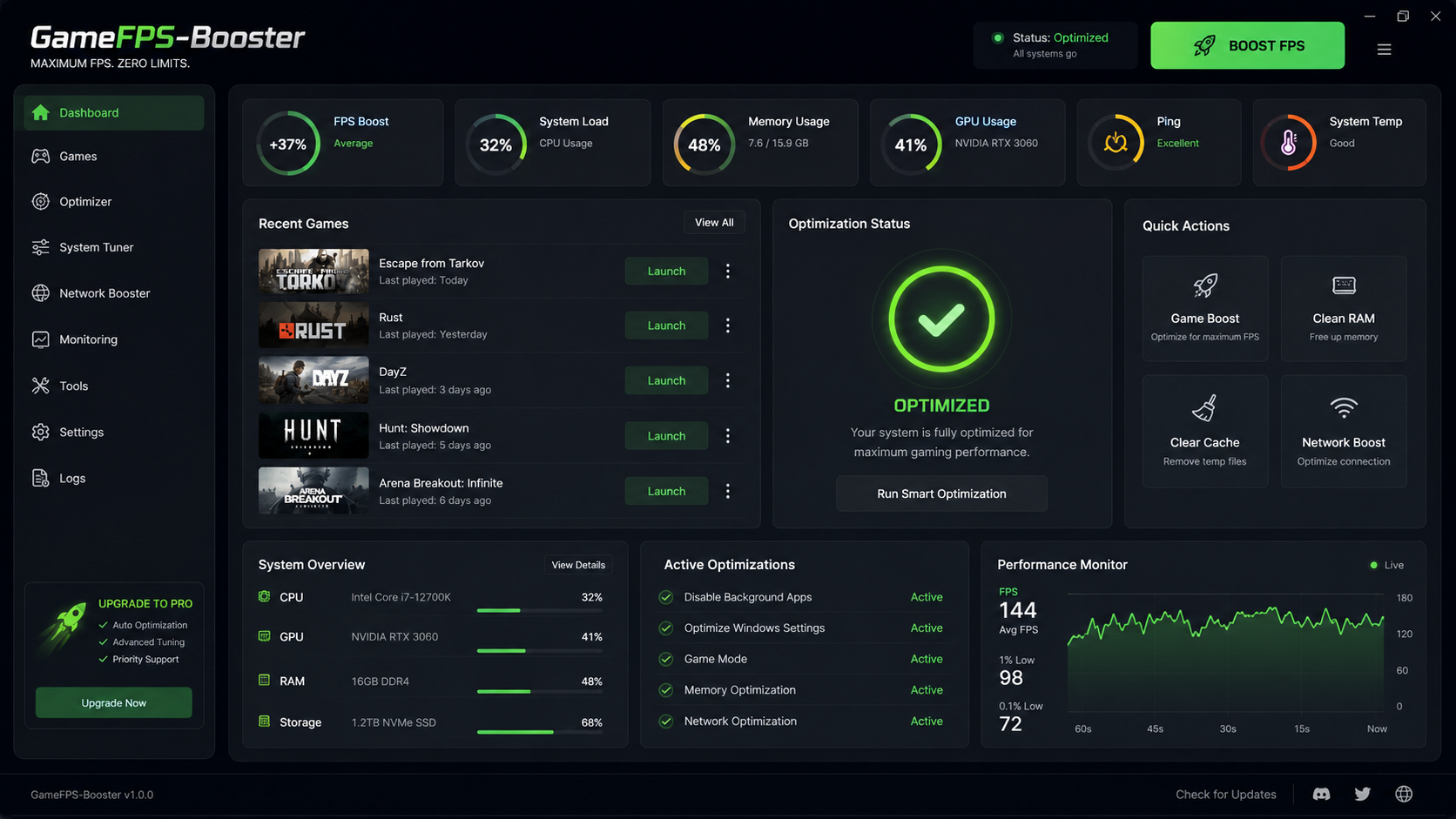
Clean, minimal dashboard – one‑click optimization for any game.
Supported Games & Profiles
| Game | Profile | Impact |
|---|---|---|
| CS2 | High Priority | +20‑30% FPS |
| Valorant | Low Latency | +15‑25% FPS |
| Rust | Memory Optimized | +25‑40% FPS |
| Apex Legends | GPU Tweak | +20‑30% FPS |
| Fortnite | Render Boost | +15‑20% FPS |
| War Thunder | CPU Affinity | +10‑20% FPS |
| Call of Duty: Warzone | VRAM Optimizer | +20‑35% FPS |
| Rainbow Six Siege | Input Lag Reducer | +15‑25% FPS |
| Escape from Tarkov | RAM Cleaner | +20‑30% FPS |
| Overwatch 2 | Power Plan Boost | +10‑20% FPS |
| Minecraft (Java) | JVM Args & GC | +30‑50% FPS |
| GTA V | Process Lasso | +15‑25% FPS |
| League of Legends | Render Queue | +10‑15% FPS |
| Dota 2 | Core Parking | +10‑20% FPS |
| Rocket League | GPU Scheduler | +10‑15% FPS |
| The Witcher 3 | Texture Streaming | +15‑20% FPS |
| Cyberpunk 2077 | DLSS/FSR Helper | +20‑40% FPS |
| Red Dead Redemption 2 | Async Compute | +15‑25% FPS |
| Battlefield 2042 | Thread Priority | +15‑20% FPS |
| Halo Infinite | GPU Clock Boost | +10‑15% FPS |
| Destiny 2 | Network Coalescing | +10‑15% FPS |
| PUBG | Render Thread | +15‑20% FPS |
| World of Warcraft | Draw Distance | +10‑20% FPS |
| Starfield | RAM Optimizer | +20‑30% FPS |
| Assassin's Creed Valhalla | GPU Power | +10‑15% FPS |
| Far Cry 6 | Texture Pool | +10‑20% FPS |
| Forza Horizon 5 | CPU Priority | +10‑15% FPS |
| Fortnite (Performance Mode) | DirectX 12 Tweak | +15‑25% FPS |
| Tom Clancy's Rainbow Six Extraction | GPU Optimizer | +15‑20% FPS |
| The Finals | Latency Fix | +20‑30% FPS |
Full list of all 50+ supported games and custom profile editor available on our website.
Key Features
One‑Click Optimize
Apply best settings instantly
Game Profiles
Fine‑tuned for 50+ titles
Real‑Time Monitor
FPS, CPU, GPU, RAM overlay
Advanced Tweaks
HPET, game mode, power plan, core parking
Registry Optimizer
Safe network & graphics adjustments
Process Manager
Priority, affinity, suspend services
Auto‑Update
Latest performance patches
Portable
No installation – run anywhere
Installation
System Requirements
- Windows 10/11 (x64, 22H2 or later)
- .NET Framework 4.8 or .NET 6.0 Runtime
- 4 GB RAM (8 GB recommended)
- 50 MB free disk space
Steps
- Download the latest GameFPS-Booster.exe from the button below.
- Run the executable – no installation needed (portable).
- Select your game from the dropdown or let it auto‑detect.
- Click Boost and enjoy smoother gameplay!
Windows 7/8.1 are not officially supported, but legacy versions are available.
How It Works
GameFPS Booster applies a combination of system‑level tweaks that are both safe and effective:
- CPU: sets high priority, disables core parking, adjusts affinity for the game process.
- GPU: forces maximum performance power plan, optimizes shader cache, and disables unnecessary visual effects.
- Memory: clears standby list, reduces RAM usage, and adjusts pagefile settings.
- Registry: tunes TCP/IP parameters, disables Nagle's algorithm, and optimizes system responsiveness.
- Processes: kills background bloatware, disables Windows telemetry and notifications during gameplay.
- Graphics: forces exclusive fullscreen, disables V‑Sync, and enables GPU hardware scheduling.
All changes are fully reversible – a single click restores all system defaults.
