FNF ModSync v1
Automatic Mod Updater & Installer for Friday Night Funkin'
About
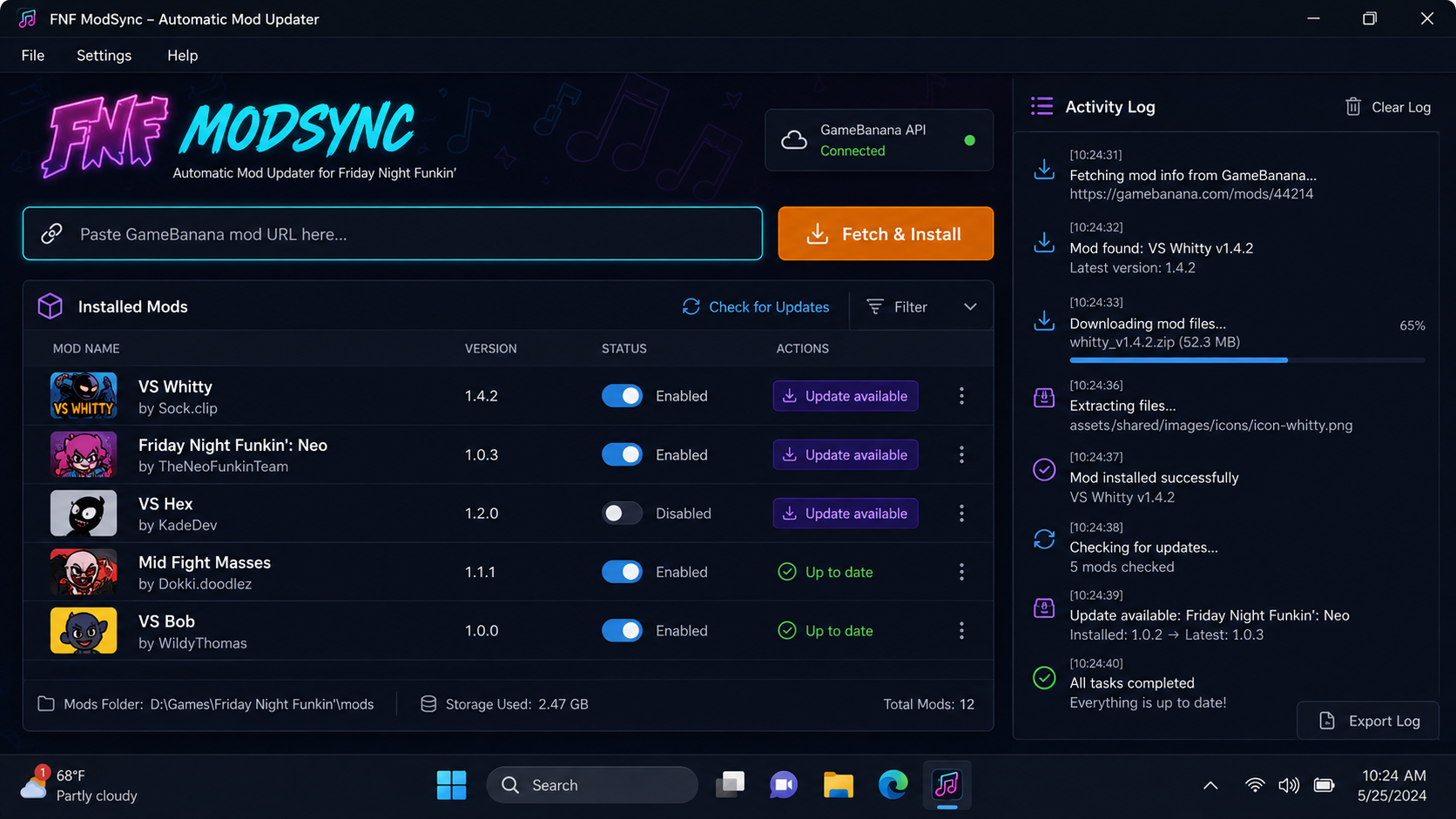
FNF ModSync does all the heavy lifting for you. Just paste a GameBanana link or let it scan your installed mods – it will download missing files, update outdated ones, and keep your mods in perfect order. Supports Psych Engine, Kade Engine, V‑Slice, and vanilla FNF.
Key Features
One‑click install – paste any GameBanana mod URL and hit "Install".
Auto‑update watch – scans your installed mods and notifies you when newer versions are available.
Smart conflict handling – detects overlapping files and lets you choose priority.
Multi‑engine support – works with Psych Engine, Kade Engine, V‑Slice, and vanilla.
Batch operations – install or update multiple mods at once.
Profile manager – save different mod sets for different playthroughs.
Installation
Requirements
- Windows 7 or newer
- Friday Night Funkin’ (any version) installed
- .NET Framework 4.8 or higher
- Internet connection for mod fetching
Steps
- Download FNF_ModSync.zip.
- Extract to any folder (e.g.,
C:\FNF_ModSync). - Run FNF_ModSync.exe.
- Point it to your FNF game folder (auto‑detects common paths).
- Paste a GameBanana mod URL or scan your current mods.
- Toggle mods on/off with a single switch.
No admin rights required – portable.
How It Works
- Fetch & Install: Paste a GameBanana URL, click "Fetch & Install".
- Update Scan: Checks your installed mods and compares with latest versions.
- Conflict Resolution: Asks you which files to keep when mods overlap.
- Profile Manager: Save different mod sets for different challenges.
FAQ
Does it work with Psych Engine mods?
Yes – it detects the engine and installs files into the correct folders.
Yes – it detects the engine and installs files into the correct folders.
Will it break my current mods?
No – it backs up original files before any changes and allows you to revert.
No – it backs up original files before any changes and allows you to revert.
Can I use it offline?
Yes, but auto‑update and search features require internet.
Yes, but auto‑update and search features require internet.
Is it safe?
Yes – Windows may show a warning because the app is not code‑signed. Click "More info" then "Run anyway". Feel free to scan with any antivirus.
Yes – Windows may show a warning because the app is not code‑signed. Click "More info" then "Run anyway". Feel free to scan with any antivirus.
Download FNF ModSync
Never worry about mod updates again – install and update with one click.
Login to Download